How does searching work?
Simple search
To start a simple search, do the following:
Enter a search term.
For a quick overview of the documents, for which you have read permissions, you can enter an asterisk * instead of a search term.Optionally, you can select a search profile to the left of the search field to limit the search to specific areas. More information: Using search profiles
Start search with the Enter key or click theicon.
Search via voice input
If voice input is enabled in your system, you can also speak the term.

Search via voice input
Click theicon.
Speak the search term.
The search is started automatically after a short pause.
Support when entering the search term
Auto suggestions: Displays auto-suggestions as you enter a search term. Auto suggestions can also be translations and synonyms if configured.
Search recommendations: Displays related search terms (optional)
Last searches: Displays your last searches (optional).
Document suggestions: Displays documents that match the currently entered search term.
Did you mean: If the search term does not throw any results, for example if you misspell a word, a correction is suggested.
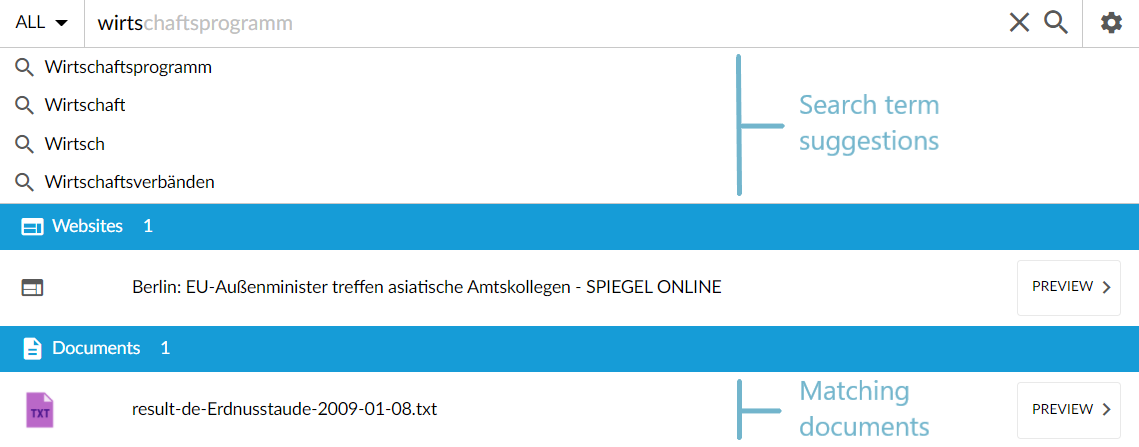
Search suggestions and recommendations
Accept a suggested search term
To accept a suggested search term, do the following:
Click on the suggestion that you want to use, or
Navigate to the suggestion using the arrow keys, and press Enter.
Search is performed for the suggested search term.
Display the suggested document
To display a suggested document, do the following:
To show the preview, click on Preview.
To open the document, click on it.
Display results for a suggested correction
To display results for a suggested correction, do the following:
After an unsuccessful search, a correction is suggested.
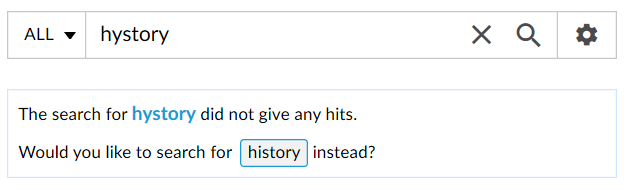
Example of a proposed correctionClick on the correction proposal.
Hits for the proposed search term are displayed.
Search with a predefined filters
If your system is configured accordingly, filters may be preset. The filters are automatically used for the search. However, you can also delete the filters before you perform the search or after you have performed the search.
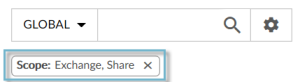
Searching with a predefined filter
Search with field names
If your system is configured accordingly, you can use field names for searching. You can use this function, for example, to search specifically for folders:
Enter the field name together with the desired value. More information about field names: Syntax for searching.
You can additionally enter the search term.
|
Entry |
To find |
|
_str.language:en |
English documents |
|
_str.language:de Stuttgart |
German documents that contain Stuttgart. |
|
_str.application:directory |
All folders for which you are authorized. |
|
_str.application:directory launcher |
All folders whose names contain the term launcher. |
For more information see: Syntax for searching.